Redeem HASHMEFREE on Android
Use this path after you start a monthly subscription in the app: open Payment methods, then select Redeem code and enter your offer code.
- 1
Subscribe to monthly Pro in HashMe
Open the HashMe app and start checkout for the monthly Pro subscription. Continue until Google Play’s payment or billing flow appears.
- 2
Open Payment methods
From that flow (or your Google Play payment settings), go to Payment methods for your Google Account so you can add or manage how you pay.
- 3
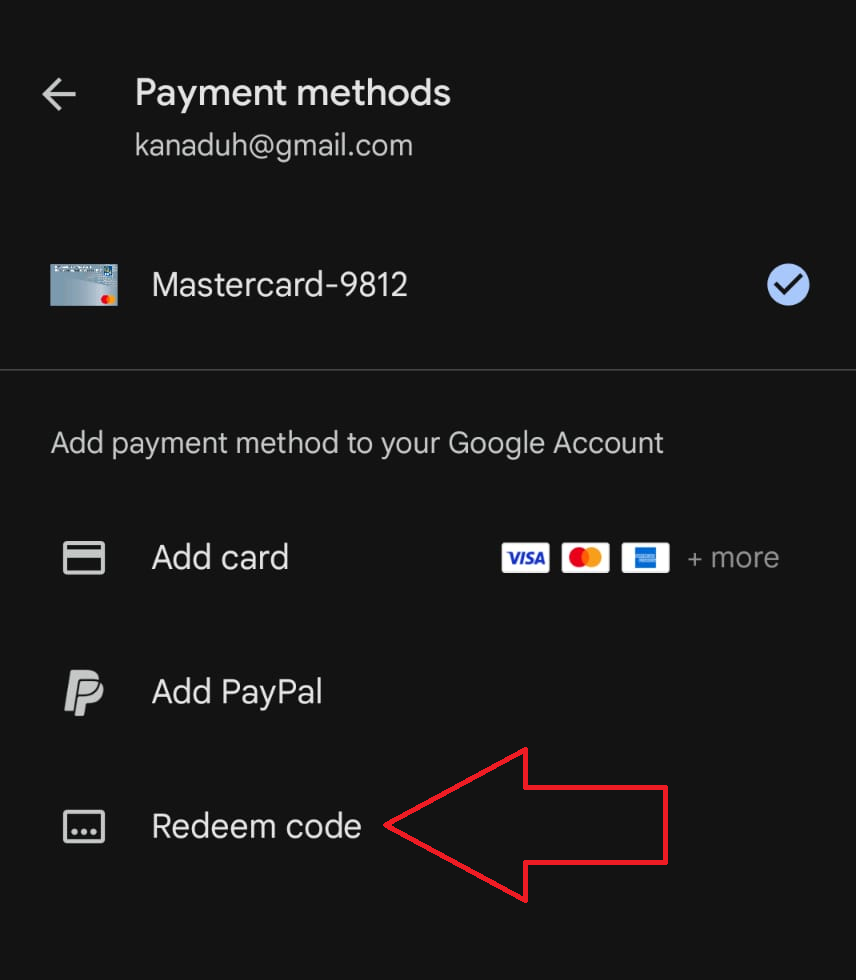
Tap "Redeem code"
Under “Add payment method to your Google Account”, choose Redeem code — the same option highlighted below.
- 4
Enter the promo code
Type HASHMEFREE and complete the steps shown in Google Play. Your one-week free offer on the monthly plan will apply according to Google's redemption rules.
Where to tap in Google Play
On the Payment methods screen, under “Add payment method to your Google Account”, choose Redeem code.
Labels and menus can vary slightly by device or Play Store version. If you don't see Payment methods, open the purchase flow again from HashMe or check pricing on this site, then return to the app to subscribe monthly.